

From prompt to harness to loop
Mona Mona on the agentic skill ladder no one told you about
Editor’s note
Last week, Ken Huang broke down agentic engineering into three disciplines: harness, context, and loops. But I couldn’t leave that discussion just at that.
Because if you talk to builders, it’s clear that the work is still moving. A couple of years ago, it was all about prompting. Then we got better at tweaking context. But now, we’re starting to move beyond that. Toward loops.
So this week, Mona picks this apart from a practitioner’s lens. I’ll leave the floor to her.
In 2023, everyone wanted to be a prompt engineer.
In 2026, the head of Claude Code at Anthropic says he doesn’t prompt Claude anymore. His words: “My job is to write loops.”
That single shift from prompting an agent to designing the loop that prompts it is the biggest change in how professionals work with AI since ChatGPT launched. And most people haven’t caught up yet.
Let me walk you up the ladder, one level at a time.
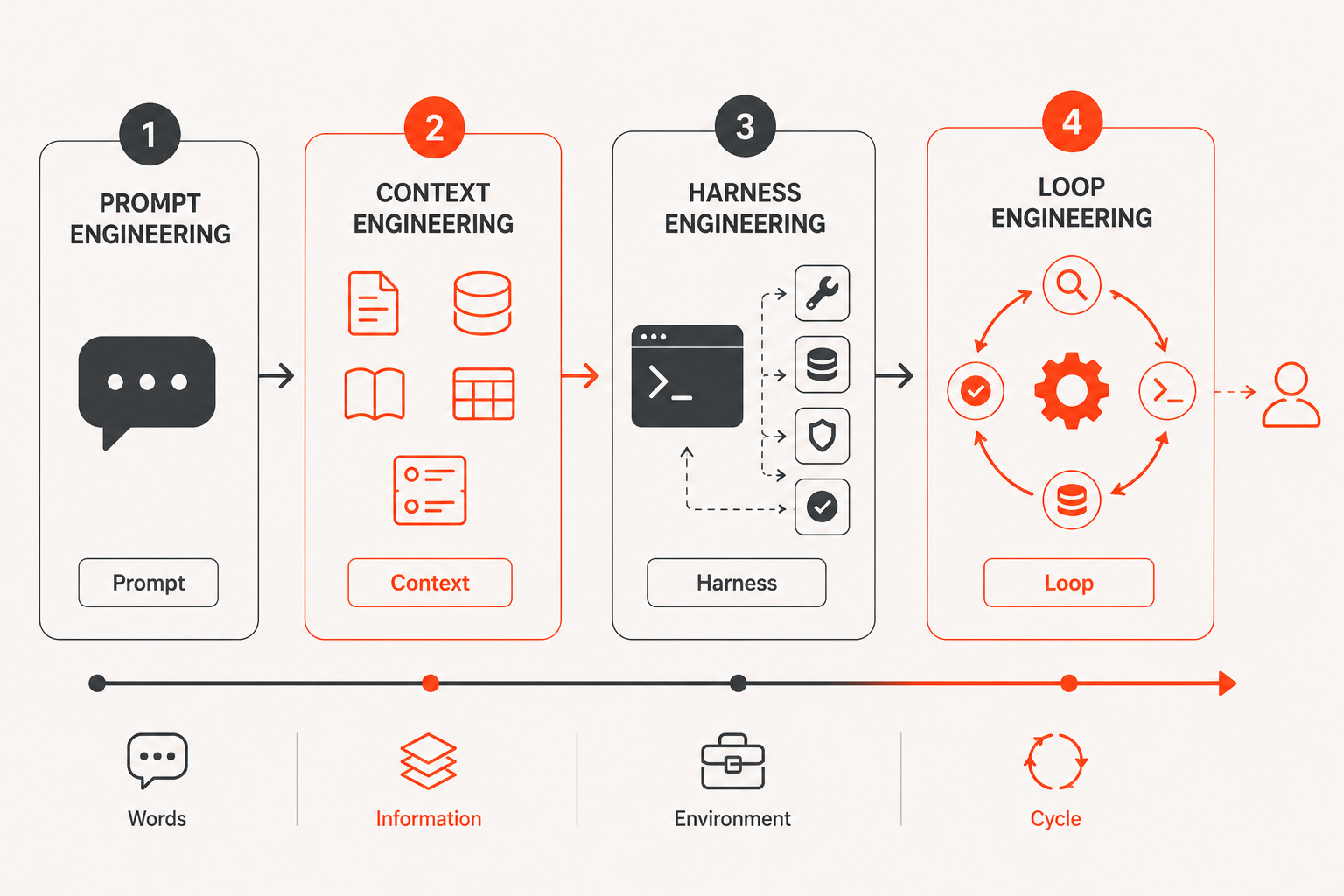
Level 1
Prompt engineering, the words you send
Prompt engineering is where all of us started. You learn that “write me a blog post” gets mediocre output, but “write a 900-word blog post for enterprise cloud architects, in a direct second-person voice, with a contrarian hook” gets something usable.
Prompt engineering is about how you express the task. Be specific. Give examples. Assign a role. Ask for a format. But it operates on one thing: the message you type into the box.
The limitation is obvious. A prompt is a single instruction to a model that has no idea who you are, what your codebase looks like, or what happened five minutes ago. You can only cram so much into words.
Level 2
Context engineering, everything the model sees
The next realization: the model’s output quality depends less on your clever phrasing and more on what information it has access to when it responds.
Context engineering is about curating everything in the model’s window — the instructions, the documents, the data, the tool definitions, the conversation history, the intermediate results. It asks a different question from prompt engineering:
Prompt engineering asks: how do I say it?
Context engineering asks: what should the model know?
This is why retrieval (RAG), memory systems, and structured tool outputs became the center of gravity for enterprise AI teams in 2024–2025. Teams needed to feed the model the right context at the right time, and what was just as important was keeping the wrong context out.
But context engineering has ceilings of its own:
The window is finite, and attention degrades before it fills.
Even massive context windows don’t mean equally useful attention across every token. Overload the window, and the model starts missing details buried in the middle. More context is not better context.
It’s a snapshot, not a conversation with reality.
Context is assembled before the model responds. Real tasks surprise you mid-execution — a dependency is missing, an API returns something malformed, a test fails. No amount of upfront curation can anticipate what only shows up when you run the thing.
The model can know everything and still do nothing.
Context engineering makes the model informed. It doesn’t make it capable. It can’t execute your code, check the result, or fix what broke. Knowledge without the ability to act is a very well-read consultant with no hands.
Curation doesn’t scale by hand.
Someone has to decide what goes into the window for every task. Past a certain complexity, assembling the context itself needs to be automated, which is the door the next two levels walk through.
Level 3
Harness engineering, the environment the agent runs in
Then agents arrived, and a prompt plus context stopped being enough.
An agent doesn’t just answer — it acts. It reads files, runs code, calls APIs, and checks its own work. For that, it needs an environment: tools it’s allowed to use, a filesystem it can touch, permissions that constrain it, feedback mechanisms that tell it whether the tests passed.
That environment is the harness. Harness engineering is designing the executable world around a single agent run — the system prompt, the tool set, the memory, the guardrails, the verification steps. If context engineering decides what the model knows, harness engineering decides what the model can do and how it finds out whether it did it well.
If you haven’t subscribed yet, pull up a chair.
If you’ve used Claude Code, Cursor, or any serious coding agent, you’ve benefited from harness engineering, whether you knew the term or not. The difference between an agent that flails and an agent that ships is usually not the model. It’s the harness.
But even a great harness has a human bottleneck: you. You’re still the one deciding what the agent works on next, reading the output, and firing the next run. One turn after another. The agent is a power tool, and you’re holding it the whole time.
Level 4
Loop engineering, the cycle that drives it all
Loop engineering removes you from the turn-by-turn seat.
Instead of prompting the agent, you build a small system (sometimes a shell script, sometimes a scheduled job, sometimes a few hundred lines of orchestration code) that runs the agent in a repeating cycle:
Discover work → dispatch it to an agent → verify the result → persist the state → decide the next action → repeat
You define the goal and the stopping condition. The loop does the iterating. It runs on a schedule (including while you sleep) or until the goal is met.
The idea crystallized fast in mid-2026. Peter Steinberger argued that the real skill had moved from prompting agents to designing their loops; Addy Osmani gave the practice its name and structure in an essay the following day; and inside Anthropic, the
Claude Code team was already describing their daily work the same way. The framing that stuck: the harness equips a single agent run — the loop is what keeps running the harness, spawning helper agents, checking results, and feeding itself the next task.
Each level wraps the one below it. The loop runs the harness. The harness carries the context. The context frames the prompt. Nothing on the ladder becomes obsolete. Rather, the leverage keeps moving up.
How to schedule a loop
Open your project in Claude Code.
Use the
/loopcommand followed by your interval and the prompt or skill you want to run.
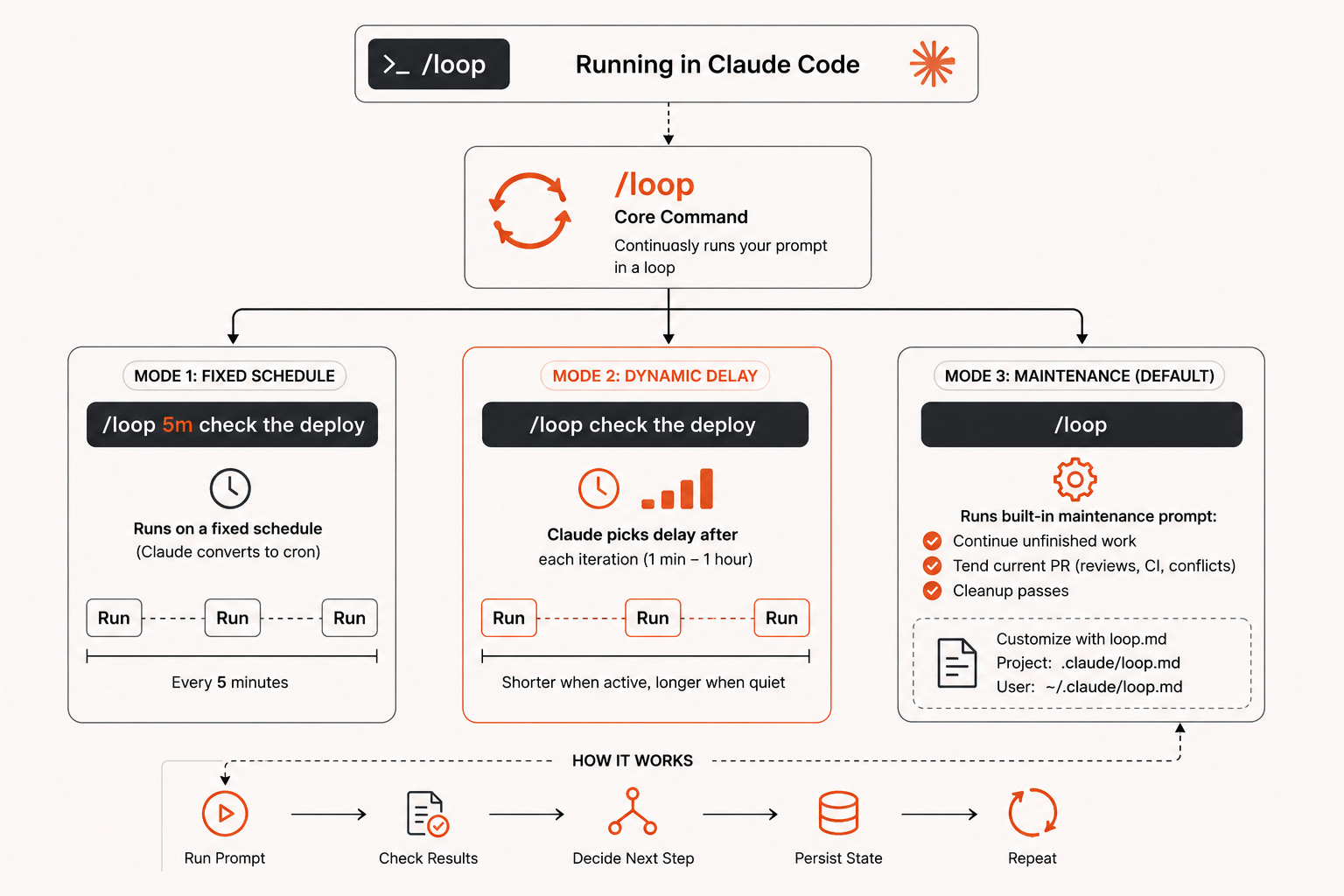
The /loop command is the core, with three modes depending on what you provide:
/loop 5m check the deploy: Runs your prompt on a fixed schedule (Claude converts the interval to a cron expression)/loop check the deploy (no interval): Claude picks the delay dynamically after each iteration, between one minute and one hour, waiting less when things are active and more when quietBare /loop: Runs a built-in maintenance prompt that continues unfinished work, tends the current PR (review comments, failed CI, merge conflicts), and does cleanup passes. You can replace this default with your own loop.md file at project level (.claude/loop.md) or user level (~/.claude/loop.md).
But here’s the part nobody puts in the headline
First: loops multiply whatever you give them. A well-designed loop multiplies a strong engineer. A badly designed one multiplies a bad decision just as fast — with less of you watching. Two people can build the identical loop: one uses it to move faster on work they deeply understand, the other uses it to avoid understanding the work at all. The loop can’t tell the difference. You can.
Second: the unglamorous work is making it stop. Ask practitioners about loops and the first war stories you’ll hear aren’t about architecture: they’re about cost. Autonomous loops that burned through hundreds of dollars overnight. Companies imposing hard monthly caps on agent spend after blowing annual AI budgets in a quarter. The production rule is simple: every loop ships with hard guards (budget limits, iteration caps, verification gates, audit logs) or it doesn’t ship.
Everything in this article assumes one foundational skill: knowing how to build an agent in the first place. The loop is only as good as the agents it orchestrates.
That’s what my latest book, AI Agents on AWS (co-authored with Bunny Kaushik, published by Packt), teaches. You’ll learn how to design agents that reason, use tools, and act autonomously; how to wire up the harness around them — memory, guardrails, verification; and how to take them from a notebook experiment to production on AWS.
Mona Mona is a Senior Worldwide GenAI Solutions Architect at AWS, where she works closely with enterprise teams to design, deploy, and scale AI systems in production. Her work spans model customization, evaluation, and inference, with a focus on how performance, cost, and reliability interact in real-world systems.
 | A guest post by
|